PDF Metadata メタデータ編集 ライブラリ
PDF メタデータ編集ライブラリ 概要

PDFメタデータについて
多くのPDFビュワー(表示アプリケーション)では以下のようなダイアログでPDFメタデータを確認できます。
PDF Metadataはそれぞれの項目を指定して編集できます。
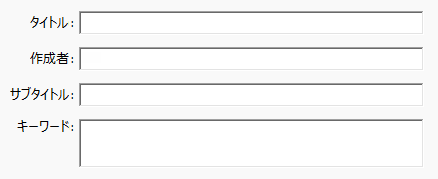
PDF文書にタイトルを指定した場合はそれをPDFビュワーのタイトルバーに表示することができます。

PDF文書に著作権表示を追加できます。
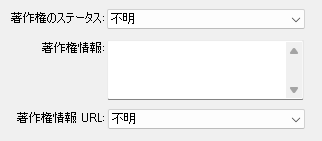
PDF Metadataライブラリは、これらの文字や設定を変更するばかりではなく、XMP仕様で規定された種々(Simple、Structure、Array)のプロパティを言語の修飾子(Qulifire)と共に編集しそれらを読み出すことができます。
この機能を使うと、大量に格納されたPDF文書の中から目的の文書をいち早く検索するシステムを構築できます。
PDF Metadataはこれらを編集します。
<?xpacket begin="" id="W5M0MpCehiHzreSzNTczkc9d"?> <x:xmpmeta xmlns:x="adobe:ns:meta/" x:xmptk="XMP Core 6.0.0"> <rdf:RDF xmlns:rdf="http://www.w3.org/1999/02/22-rdf-syntax-ns#"> <rdf:Description rdf:about="" xmlns:dc="http://purl.org/dc/elements/1.1/" xmlns:xmpRights="http://ns.adobe.com/xap/1.0/rights/" xmlns:xmp="http://ns.adobe.com/xap/1.0/" xmlns:pdf="http://ns.adobe.com/pdf/1.3/"> <dc:format>application/pdf</dc:format> <dc:creator> <rdf:Seq> <rdf:li>作成者</rdf:li> </rdf:Seq> </dc:creator> <dc:title> <rdf:Alt> <rdf:li xml:lang="x-default">文書タイトル</rdf:li> </rdf:Alt> </dc:title> <dc:rights> <rdf:Alt> <rdf:li xml:lang="x-default">Copyright 2014-2026 株式会社トラスト・ソフトウェア・システム</rdf:li> </rdf:Alt> </dc:rights> <xmpRights:WebStatement>https//www.trustss.co.jp/</xmpRights:WebStatement> <xmpRights:Marked>False</xmpRights:Marked> <xmp:CreateDate>2026-01-21T00:00:00+09:00</xmp:CreateDate> <xmp:MetadataDate>2026-01-21T00:00:00+09:00</xmp:MetadataDate> <xmp:ModifyDate>2026-01-21T00:00:00+09:00</xmp:ModifyDate> <xmp:CreatorTool>PDF Structure Library (https://www.trustss.co.jp/)</xmp:CreatorTool> <pdf:Producer>PDF Structure Library Ver 1.10.2 (https://www.trustss.co.jp/)</pdf:Producer> </rdf:Description> </rdf:RDF> </x:xmpmeta>
PDFメタデータ編集のサンプルコード
タイトルの編集
メタデータのdc:titleプロパティを編集するサンプルコードです。
PDF2.0より以前のPDF文書タイトルは文書情報(Document Information)ディクショナリのTitle要素に記載していました。
しかし、PDF2.0ではメタデータに記載することが推奨されています。
PDF Metadataライブラリは互換性のためにDocument Informationディクショナリにも記載されます。
PDFのタイトルを編集するサンプル:
using PDFTools.PdfStructure;
using (var stc = new Structure("0-0314-H9KE1K408HW8"))
{
    stc.OpenDoc("in.pdf");

    // XMPインターフェース
    XmpInterface xmp = stc.GetXmpInterface();

    //タイトル
    xmp.ReplaceTitle("ja-JP", "文書のタイトル");
    xmp.SetTitle("en-US", "Document Title");

    //タイトルをウインドウタイトルバーに表示
    stc.DisplayTitleFlag(true);  //省略可

    //出力
    stc.SavePDF("out.pdf");

    // XMPインターフェース終了
    xmp.CloseInterface();
}
SetDisplayTitleFlag(true)を実行すると、既定言語のタイトル文字がPDFビュワーのタイトルバーに表示されます。
これにより、メタデータの<dc:title>プロパティに以下のように記載されます。
   <dc:title>
      <rdf:Alt>
         <rdf:li xml:lang="x-default">文書タイトル</rdf:li>
         <rdf:li xml:lang="ja-JP">文書タイトル</rdf:li>
         <rdf:li xml:lang="en-UK">Document Title</rdf:li>
      </rdf:Alt>
   </dc:title>
作成者の編集
メタデータのdc:creatorプロパティを編集するサンプルコードです。
PDF2.0より以前のPDF文書作成者は文書情報(Document Information)ディクショナリのAuthor要素に記載していました。
しかし、PDF2.0ではメタデータに記載することが推奨されています。
PDF Metadataライブラリは互換性のためにDocument Informationディクショナリにも記載されます。
PDFの作成者を編集するサンプル:
using PDFTools.PdfStructure;
using (var stc = new Structure("0-0314-H9KE1K408HW8"))
{
    stc.OpenDoc("in.pdf");

    // XMPインターフェース
    XmpInterface xmp = stc.GetXmpInterface();

    //作成者
    xmp.ReplaceCreator("作成者");

    //出力
    stc.SavePDF("out.pdf");

    // XMPインターフェース終了
    xmp.CloseInterface();
}
これにより、メタデータの<dc:creator>プロパティに以下のように記載されます。
   <dc:creator>
      <rdf:Seq>
         <rdf:li>作成者</rdf:li>
      </rdf:Seq>
   </dc:creator>
サブタイトル(文書の説明)の編集
メタデータのdc:descriptionプロパティを編集するサンプルコードです。
PDF2.0より以前のサブタイトル(文書の説明)は文書情報(Document Information)ディクショナリのSubject要素に記載していました。
しかし、PDF2.0ではメタデータに記載することが推奨されています。
PDF Metadataライブラリは互換性のためにDocument Informationディクショナリにも記載されます。
using PDFTools.PdfStructure;
using (var stc = new Structure("0-0314-H9KE1K408HW8"))
{
    stc.OpenDoc("in.pdf");

    // XMPインターフェース
    XmpInterface xmp = stc.GetXmpInterface();

    //説明(Description)
    xmp.ReplaceDescription("ja-JP", "作成者");
    xmp.SetDescription("en-UK", "Description");

    //出力
    stc.SavePDF("out.pdf");

    // XMPインターフェース終了
    xmp.CloseInterface();
}
これにより、メタデータの<dc:description>プロパティに以下のように記載されます。
   <dc:description>
      <rdf:Alt>
         <rdf:li xml:lang="x-default">説明</rdf:li>
         <rdf:li xml:lang="ja-JP">説明</rdf:li>
         <rdf:li xml:lang="en-UK">Description</rdf:li>
      </rdf:Alt>
   </dc:title>
キーワードの編集
メタデータのdc:keywordsプロパティを編集するサンプルコードです。
PDF2.0より以前のキーワードは文書情報(Document Information)ディクショナリのKeywords要素に記載していました。
しかし、PDF2.0ではメタデータに記載することが推奨されています。
PDF Metadataライブラリはメタデータのpdf:Keywordsにも記載し、互換性のためにDocument Informationディクショナリにも記載されます。
using PDFTools.PdfStructure;
using (var stc = new Structure("0-0314-H9KE1K408HW8"))
{
    stc.OpenDoc("in.pdf");

    // XMPインターフェース
    XmpInterface xmp = stc.GetXmpInterface();

    //キーワード
    xmp.ReplaceKeywords("キーワード1,キーワード2");  //複数のキーワード指定可

    //出力
    stc.SavePDF("out.pdf");

    // XMPインターフェース終了
    xmp.CloseInterface();
}
これにより、メタデータの<dc:subject>プロパティおよび、<pdf:Keywords>プロパティに以下のように記載されます。
   <dc:subject>
      <rdf:Bag>
         <rdf:li>キーワード1</rdf:li>
         <rdf:li>キーワード2</rdf:li>
      </rdf:Bag>
   </dc:subject>
   <pdf:Keywords>キーワード1; キーワード2</pdf:Keywords>
著作権表示の編集
PDF Metadataライブラリは著作権表示をメタデータに記載し、「著作権取得済み」などのフラグを設定します。
using PDFTools.PdfStructure;
using (var stc = new Structure("0-0314-H9KE1K408HW8"))
{
    stc.OpenDoc("in.pdf");

    // XMPインターフェース
    XmpInterface xmp = stc.GetXmpInterface();

    //著作権
    xmp.ReplaceRights("ja-JP", "株式会社トラスト・ソフトウェア・システム");
    xmp.SetRights("en-US", "Trust Software System Co.,Ltd.");
    xmp.ReplaceRightsWebStatement("https://www.trustss.co.jp/");
//  xmp.ReplaceRightsMarked(true);

    //出力
    stc.SavePDF("out.pdf");

    // XMPインターフェース終了
    xmp.CloseInterface();
}
これにより、メタデータの<dc:rigths>プロパティに以下のように記載されます。
   <dc:rights>
      <rdf:Alt>
         <rdf:li xml:lang="x-default">Copyright 2014-2025 株式会社トラスト・ソフトウェア・システム</rdf:li>
         <rdf:li xml:lang="ja-JP">Copyright 2014-2025 株式会社トラスト・ソフトウェア・システム</rdf:li>
         <rdf:li xml:lang="en">Copyright 2014-2025 Trust Software System Co.,Ltd.</rdf:li>
      </rdf:Alt>
   </dc:rights>
Simpleプロパティの編集
Simple(単純)プロパティの値は Unicode標準で定義されているUnicodeテキストの文字列です。
この値を持つXMPプロパティの要素コンテンツは値を提供するテキストでなければなりません。
using PDFTools.PdfStructure;
using PDFTools.PdfStructure.Constants;

using (var stc = new Structure("0-0314-H9KE1K408HW8"))
{
    stc.OpenDoc("in.pdf");

    // XMPインターフェース
    XmpInterface xmp = stc.GetXmpInterface();

    //Simpleプロパティ
    string prop = "Rating";
    if (0 >= xmp.DoesSimplePropertyExist(kXMP_NS.XMP, prop))
    {
        //書き込み
        xmp.SetSimpleProperty(kXMP_NS.XMP, prop, "3");
    }
    //読み出し
    Console.WriteLine($"{prop} = {xmp.GetSimpleProperty(kXMP_NS.XMP, prop)}");

    //出力
    stc.SavePDF("out.pdf");

    // XMPインターフェース終了
    xmp.CloseInterface();
}
これにより、メタデータの<xmp:Rating>プロパティに以下のように記載されます。
<xmp:Rating>3</xmp:Rating>
Structureプロパティの編集
Structure(構造)プロパティの値は0個以上の名前付きフィールドのコンテナーです。構造内の各フィールドの順序は重要ではありません。
using PDFTools.PdfStructure;
using PDFTools.PdfStructure.Constants;

using (var stc = new Structure("0-0314-H9KE1K408HW8"))
{
    stc.OpenDoc("in.pdf");

    // XMPインターフェース
    XmpInterface xmp = stc.GetXmpInterface();

    //Structureプロパティ
    prop = "MaxPageSize";
    if (0 >= xmp.DoesStructPropertyExist(kXMP_NS.XMP_T_PG, prop))
    {
        //書き込み
        xmp.SetStructField(kXMP_NS.XMP_T_PG, prop, kXMP_NS.XMP_Dimensions, "h", "297");
        xmp.SetStructField(kXMP_NS.XMP_T_PG, prop, kXMP_NS.XMP_Dimensions, "w", "210");
        xmp.SetStructField(kXMP_NS.XMP_T_PG, prop, kXMP_NS.XMP_Dimensions, "unit", "mm");
    }
    //読み出し
    Console.WriteLine($"{prop}[h] = {xmp.GetStructField(kXMP_NS.XMP_T_PG, prop, kXMP_NS.XMP_Dimensions, "h")}");
    Console.WriteLine($"{prop}[w] = {xmp.GetStructField(kXMP_NS.XMP_T_PG, prop, kXMP_NS.XMP_Dimensions, "w")}");
    Console.WriteLine($"{prop}[unit] = {xmp.GetStructField(kXMP_NS.XMP_T_PG, prop, kXMP_NS.XMP_Dimensions, "unit")}");

    //出力
    stc.SavePDF("out.pdf");

    // XMPインターフェース終了
    xmp.CloseInterface();
}
これにより、メタデータの<xmpTPg:MaxPageSize>プロパティに以下のように記載されます。 PDF Metadataではrdf:Description要素をrdf:parseType="Resource"属性に置き換えたStructureプロパティとします。
   <xmpTPg:MaxPageSize rdf:parseType="Resource">
      <stDim:h>297</stDim:h>
      <stDim:w>210</stDim:w>
      <stDim:unit>mm</stDim:unit>
   </xmpTPg:MaxPageSize>
Array順序付(Orderd)プロパティの編集
Array(配列)プロパティの値は1から始まる序数で位置付けされた0個以上のアイテムのコンテナです。Arrayアイテムの形式は任意のXMP値形式にすることができ、配列内のすべてのアイテムは同じデータ型にします。
以下では順序付(Orderd)プロパティの場合を示します。
using PDFTools.PdfStructure;
using PDFTools.PdfStructure.Constants;

using (var stc = new Structure("0-0314-H9KE1K408HW8"))
{
    stc.OpenDoc("in.pdf");

    // XMPインターフェース
    XmpInterface xmp = stc.GetXmpInterface();

    //Array(Ordered)プロパティ
    prop = "ordered-subject";
    string[] val = { "XMP", "metadata", "PDF Metadata" };
    if (0 >= xmp.DoesArrayPropertyExist(kXMP_NS.XMP_T_PG, prop))
    {
        //書き込み
        for (int i = 0; i < val.Length; i++)
            xmp.AppendArrayItem(kXMP_NS.DC, prop, kXMP_Prop.ArrayIsOrdered, val[i]);
    }
    //読み出し
    int cnt = xmp.CountArrayItems(kXMP_NS.DC, prop);
    for (int i = 1; i <= cnt; i++)
        Console.WriteLine($"{prop}[{i}] = {xmp.GetArrayItem(kXMP_NS.DC, prop, i)}");

    //出力
    stc.SavePDF("out.pdf");

    // XMPインターフェース終了
    xmp.CloseInterface();
}
これにより、メタデータの<xmpTPg:MaxPageSize>プロパティに以下のように記載されます。
   <dc:OrderedSubject>
      <rdf:Seq>
         <rdf:li>XMP</rdf:li>
         <rdf:li>metadata</rdf:li>
         <rdf:li>PDF Metadata</rdf:li>
      </rdf:Seq>
   </dc:OrderedSubject>
Array順序無(Unorderd)プロパティの編集
Array(配列)プロパティの値は1から始まる序数で位置付けされた0個以上のアイテムのコンテナです。Arrayアイテムの形式は任意のXMP値形式にすることができ、配列内のすべてのアイテムは同じデータ型にします。
以下では順序無(Unorderd)プロパティの場合を示します。
using PDFTools.PdfStructure;
using PDFTools.PdfStructure.Constants;

using (var stc = new Structure("0-0314-H9KE1K408HW8"))
{
    stc.OpenDoc("in.pdf");

    // XMPインターフェース
    XmpInterface xmp = stc.GetXmpInterface();

    //Array(Unrdered)プロパティ
    prop = "unordered-subject";
    string[] val = { "XMP", "metadata", "PDF Metadata" };
    if (0 >= xmp.DoesArrayPropertyExist(kXMP_NS.XMP_T_PG, prop))
    {
        //書き込み
        for (int i = 0; i < val.Length; i++)
            xmp.AppendArrayItem(kXMP_NS.DC, prop, kXMP_Prop.ArrayIsUnordered, val[i]);
    }
    //読み出し
    cnt = xmp.CountArrayItems(kXMP_NS.DC, prop);
    for (int i = 1; i <= cnt; i++)
        Console.WriteLine($"{prop}[{i}] = {xmp.GetArrayItem(kXMP_NS.DC, prop, i)}");

    //出力
    stc.SavePDF("out.pdf");

    // XMPインターフェース終了
    xmp.CloseInterface();
}
これにより、メタデータの<xmpTPg:MaxPageSize>プロパティに以下のように記載されます。
   <dc:UnorderedSubject>
      <rdf:Bag>
         <rdf:li>XMP</rdf:li>
         <rdf:li>metadata</rdf:li>
         <rdf:li>PDF Metadata</rdf:li>
      </rdf:Bag>
   </dc:UnorderedSubject>